Beach Out: A Whimsical Serif Font for Summer Designs
Capturing the essence of a perfect summer day requires more than just a picture; it demands typography that evokes that specific feeling of warmth, relaxation, and fun. That is exactly what Beach Out delivers. As a premium font, it offers a fresh take on modern typography by blending the structure of a serif font with the playful spirit of the seaside. It is not just a typeface; it is a design asset that immediately sets a mood. If you are looking for a creative font that moves beyond standard sans serif font options, this whimsical serif font filled with sand and beach elements might be the perfect addition to your toolkit.
The Aesthetic Appeal of Beach Out
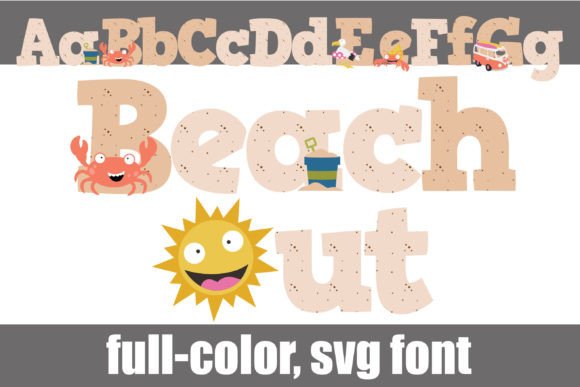
At its core, Beach Out is a full-color display font. The visual characteristics are distinct: the letterforms feature a whimsical serif structure, but the interior fill is where the magic happens. Instead of a solid block color, the letters are textured with sand and populated with beach-related items like seashells, starfish, and tropical flora. This intricate design makes it a standout choice for logo design, packaging design, and editorial design where visual impact is the priority.
One of the most valuable features of this typeface is its versatility through alternates. The package includes an alternative case with additional colors, accessible via your system’s glyph map or directly through Silhouette Studio. This allows you to tweak the color palette to match specific brand identity guidelines or the aesthetic of a particular project. Because it is an OpenType full-color (SVG) font, it retains these rich details and gradients when typed, provided you are using compatible software.
Compatibility and Technical Details
Working with full-color SVG fonts is a straightforward process, but it requires the right environment. Beach Out installs just like any standard .OTF file—via FontBook on Mac or the Control Panel/font manager on Windows. However, it is crucial to understand program compatibility to avoid frustration.
Programs that support SVG technology, such as Adobe Illustrator, Photoshop, Silhouette Studio, Quark, and Inkscape, will render the full color and sand textures of Beach Out. In these environments, you will see the colors in the preview window or once you begin typing. If you use the font in a non-compatible program, it will typically render as a standard black silhouette. This fallback ensures that the text remains legible as a standard serif font, but you lose the signature "filled" aesthetic. Always test the font in your specific software environment before finalizing a design.
Practical Applications for Branding and Marketing
As a creative font, Beach Out excels in scenarios where you need to grab attention instantly. It is not designed for long-form body copy; rather, it is a powerhouse for titles, headers, and display text. Its personality is inherently joyful and relaxed, making it an excellent choice for specific niches.
- Logo Design and Brand Identity: For businesses in the tourism, hospitality, or lifestyle sectors, this font can anchor a brand identity. Imagine a boutique hotel or a surf shop using this typeface for their wordmark. It instantly communicates the vibe of the business without needing additional imagery.
- Packaging Design: Product packaging for summer-themed goods—such as sunscreen, tropical snacks, or artisanal candles—benefits greatly from this aesthetic. The textured look adds a tactile quality to the visual design, making the product feel premium and thematic.
- Social Media Graphics: In the fast-scrolling environment of social media, a bold, colorful display font stops the thumb. Use Beach Out for sale announcements, event flyers, or Instagram stories to inject energy into your feed.
- Crafting and DIY Projects: For hobbyists and crafters, particularly those using Silhouette machines, this font is a game-changer for creating custom t-shirts, tote bags, and party invitations. The ability to cut these shapes with precision makes it a favorite for physical goods.
Font Pairing and Hierarchy
When incorporating Beach Out into your designs, font pairing is essential to maintain professionalism and readability. Because this typeface is ornate and textured, it pairs best with cleaner, more neutral fonts.
A classic combination is pairing this whimsical serif with a clean sans serif font. For example, use Beach Out for the main headline to draw the eye, and use a font like Montserrat or Open Sans for subheadings and body text. This contrast creates a clear visual hierarchy, ensuring that the decorative font enhances the design without overwhelming the reader. Avoid pairing it with other script fonts or overly detailed handwritten fonts, as this can create visual clutter.
Evaluating Fit and Licensing
Before integrating this asset into your workflow, consider the nature of your project. If you are designing a legal document, a technical manual, or a long-form blog post, Beach Out is not the appropriate tool. However, if you are working on a magazine cover, a wedding invitation for a destination ceremony, or a menu for a beachside café, it is an ideal fit.
From a commercial perspective, always review the licensing terms associated with the font. Most premium fonts allow for commercial use in logos and merchandise, but the specific terms can vary. Ensure that your license covers the intended usage, especially if you plan to sell physical products featuring the font.
Ultimately, Beach Out offers a unique blend of technical sophistication (via SVG technology) and artistic flair. By understanding its strengths and limitations, you can leverage this display font to create designs that are not only visually striking but also professionally polished. It is a reminder that typography is not just about legibility; it is about personality and connection.