Emoticat: A Playful Sans Serif Font for Creative Projects
More Than Just Letters: The Charm of Emoticat
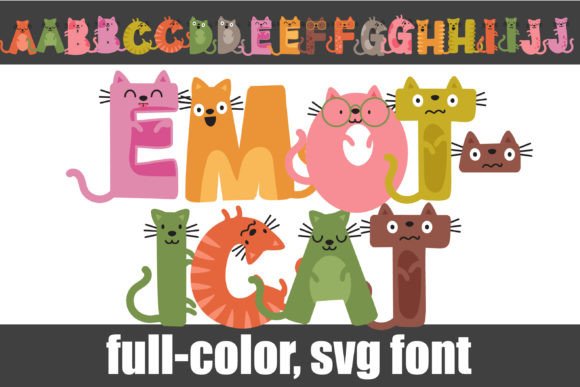
If you've ever scrolled through a sea of standard sans serif fonts and felt a pang of creative fatigue, let me introduce you to Emoticat. This isn't your typical, run-of-the-mill typeface. At its core, Emoticat is a full-color font where each letter and symbol is cleverly designed to resemble a stylized cat face. The visual personality is immediate: it's whimsical, friendly, and bursting with character. The sans serif lettering ensures the shapes remain clean and legible, even as they incorporate feline features like ears, whiskers, and expressive eyes. It’s a premium font that manages to be both highly specific in its theme and surprisingly versatile in its application.
The true magic lies in its implementation as an OpenType full-color (SVG) font. This means the cats aren't just outlines; they can be rendered in multiple, vibrant colors directly within your text. The included alt case with additional colors is a fantastic bonus, accessible through your system's character map or via Silhouette's glyph map, giving you even more creative control. This modern typography approach transforms simple text into a visual element, making Emoticat a standout design asset for projects that need to make an immediate, joyful impression.
Where Emoticat Truly Shines: Practical Applications
Understanding a font's personality is one thing; knowing where to deploy it is where the real value lies. Emoticat is fundamentally a display font. Its detailed, colorful nature makes it less suited for body text but perfect for headlines, titles, and short, impactful phrases where its charm can be fully appreciated.
For brand identity, particularly for businesses with a playful, approachable, or family-friendly vibe, Emoticat can be a game-changer. Think of a children's bookstore, a pet grooming service, a quirky café, or a line of artisanal cat-themed goods. Using Emoticat for your logo design or primary headline font instantly communicates your brand's unique personality. It’s a commercial font that can help a small business stand out in a crowded market, fostering immediate recognition and a memorable brand perception.
In marketing and publishing, it excels. Social media graphics are a prime candidate. An Instagram story announcement or a Pinterest pin for a blog post titled "10 Reasons Cats Run the Internet" would pop with Emoticat. For editorial design, it could be a stunning drop cap or a chapter title in a niche magazine. In packaging design, imagine a logo for a gourmet cat treat brand or the header on a box of feline-themed stationery—it adds a layer of personality and delight that generic fonts simply can't match.
Working With a Color Font: A Designer's Guide
Integrating Emoticat into your workflow is straightforward, but a few practical notes will ensure success. First, installation. Like any .otf font, you install it via FontBook on a Mac or your preferred font manager/Control Panel on Windows. The key compatibility point to remember is that its full-color glory is only visible in supporting software. Adobe Illustrator, Photoshop, InDesign, Silhouette Studio, Quark, and Inkscape are among the programs that currently support full-color SVG fonts.
Crucially, in non-compatible programs, Emoticat will render as a standard black, solid font. This is normal. You'll know your program supports it when you type and see the colors. Even in some compatible software, the font preview window might show it in black—test it directly on your canvas. For font pairing, balance is key. Since Emoticat is so expressive, pair it with a clean, neutral sans serif or even a simple serif font for any accompanying body text. This maintains visual hierarchy and ensures readability while letting Emoticat's personality do the talking without overwhelming the viewer.
Before finalizing a project, always test. Check how the colors render on different backgrounds. Review the alternate characters in the glyph map to see if a different color set better suits your palette. Consider your audience: for a formal report, it's likely not the right choice. But for a fun, engaging, and creative project aiming to connect with a modern audience, Emoticat offers a unique blend of charm, modern font technology, and practical design utility that can elevate your work from ordinary to unforgettable.